Body and Ball: Your Sportsbox Report Meets Your Launch Monitor
A Sportsbox AI Swing Score Report is one of the most detailed pictures of a golf swing you can get from a phone: rotation, sway and lift, segment speeds, gain factors, transition order, and how consistent every position is across your swings, each against a tour range.
On this page
It answers what your body did. It cannot answer the question that decides what you should practice: did it matter to the ball?
A shoulder gain factor below the tour range is interesting. Whether it is worth a month of practice depends on whether it is costing you club speed. An inconsistent impact position matters if your carries are scattering, and much less if they are not. Your launch monitor already holds that answer. Body and Ball connects the two.
The idea in one line
Body data alone is a hypothesis. Body data your ball confirms is a finding.
Every link in Body and Ball pairs a body metric with the ball-flight pattern it should cause, and only calls something a fault when both sides agree.
The Body-Ball map
Every link is shown every time, whether or not anything is wrong, in one of four states:
| State | Body | Ball | What it means |
|---|---|---|---|
| Confirmed | Outside its range | Shows the pattern | A real fault, costing you on the ball. You get the evidence from both sides, the strokes it costs, and the fix. |
| Ball only | In range | Shows the pattern | The miss is real, but this body move is not causing it. ShotIQ tells you where to look instead. |
| Watch | Outside its range | Normal | Your body shows it, your ball does not yet. Not a fault. Keep an eye on it. |
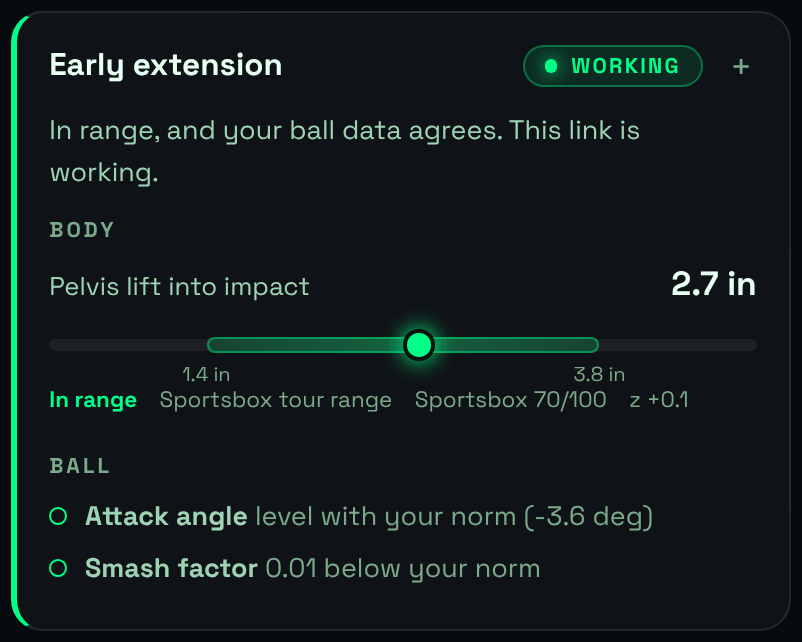
| Working | In range | Normal | This link is doing its job, and you have the proof. |
"Ball only" and "Working" are as valuable as "Confirmed". One stops you chasing the wrong fix; the other tells you what to leave alone.
The links
| Link | Body (Sportsbox) | Ball (launch monitor) |
|---|---|---|
| Low point instability | Sway gap and lift varying swing to swing at impact | Carry spread wide, with both short and long misses |
| Casting / added loft | Wrist release percent above the tour range, or a lead wrist extended at impact | Launch and spin both above the optimal window for your ball speed |
| Sequence inefficiency | Transition order out of sequence, or core or shoulder gain below the tour range | Club speed below what your x-factor and build predict |
| Early extension | Pelvis lift into impact above the tour range | Attack angle steeper and smash lower than your norm, with misses to the trail side |
| Path from side bend | Chest side bend at impact outside its band | Club path and spin axis consistently one way, in the direction the side bend predicts |
Wherever your report prints a tour range, that range is the threshold: Sportsbox's own reference for your club decides what counts as out of range, not a number ShotIQ made up. ShotIQ's own limits are used only for screenshots and values typed in by hand.
A real analysis, step by step
Here is Body and Ball reading one real Sportsbox AI Swing Score Report: a 6 iron, 10 swings, a Swing Score of 77. The launch monitor sessions it is checked against are example data, shaped like a typical golfer's: 25 recent shots with carries scattering short and long, and healthy launch, spin and club speed.
1. The capture, and Sportsbox's focus areas answered
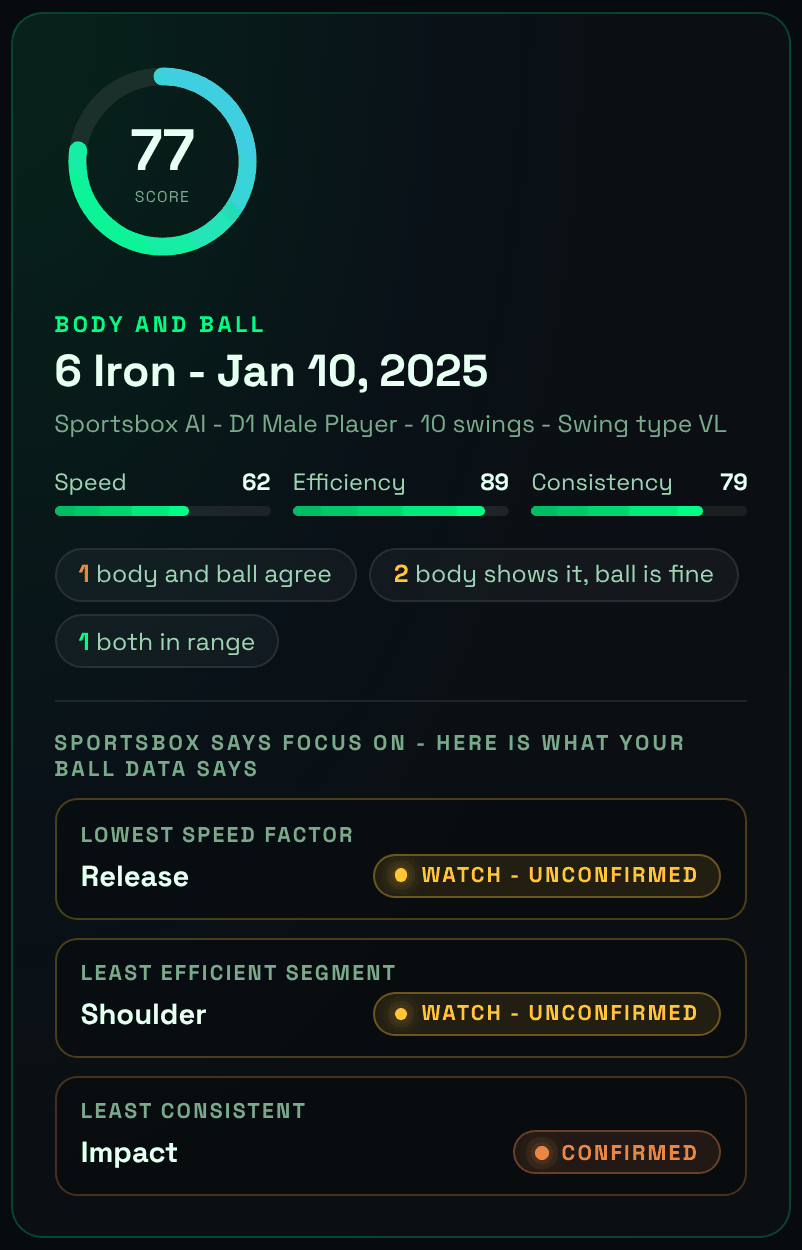
The report names three things to work on. Body and Ball tells you which of them your ball flight actually agrees with. Here, only one of the three is costing this golfer on the ball today.
2. What is costing you
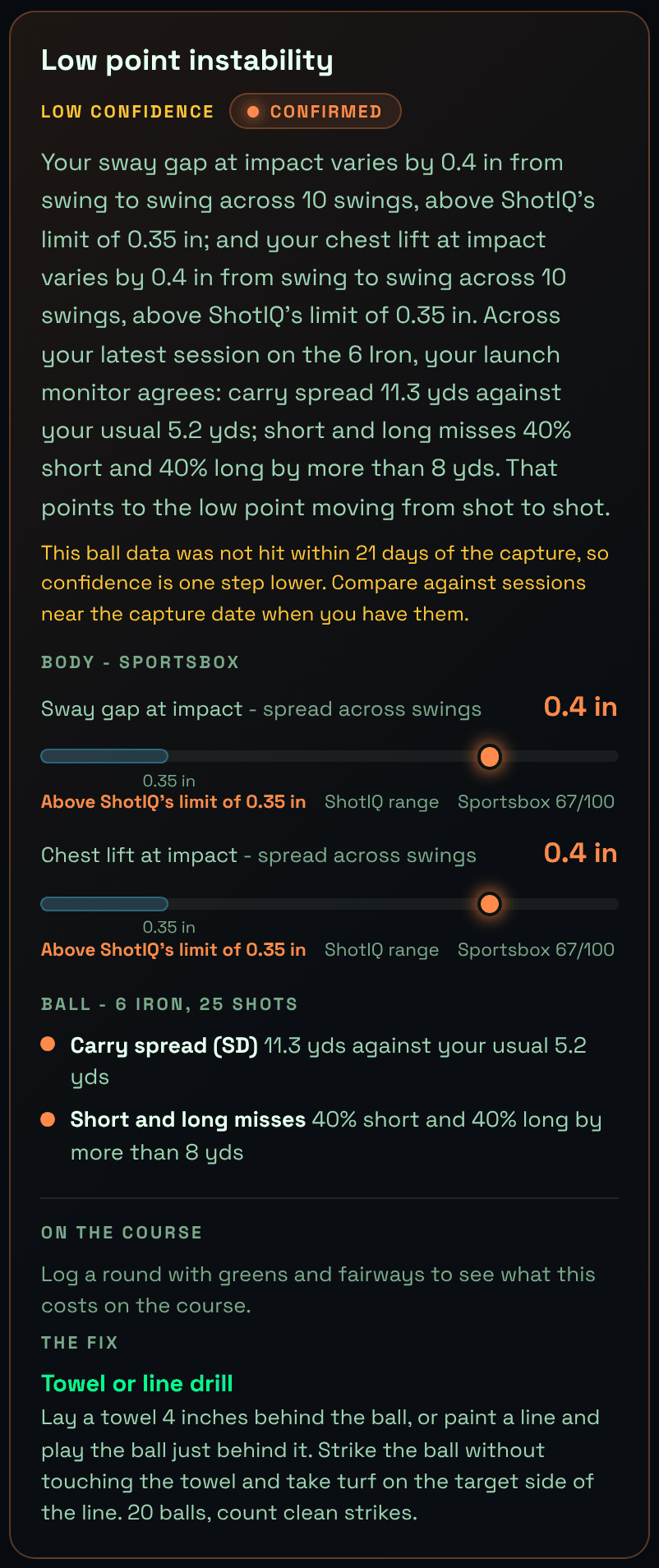
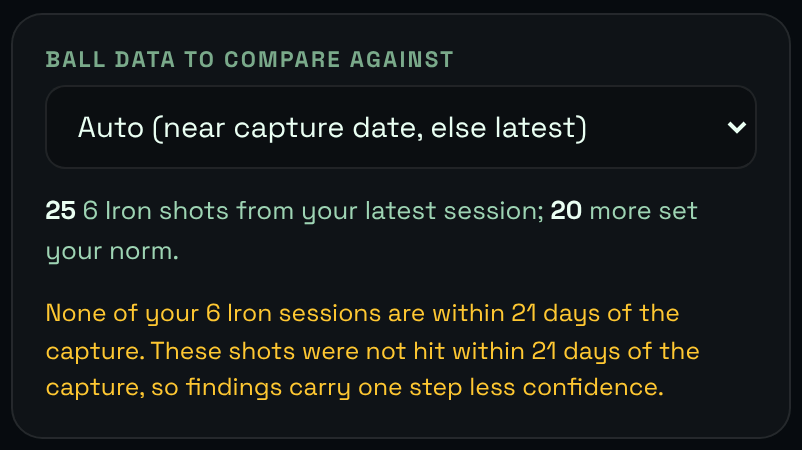
A finding needs both sides to agree. The body evidence here is the spread of the impact position across the 10 swings, from the Consistency pages of the report. The ball evidence is the carry spread and the mix of short and long misses. The amber note is ShotIQ being honest that these shots were not hit near the day of the capture, so confidence is one step lower.
3. Watch, not fix
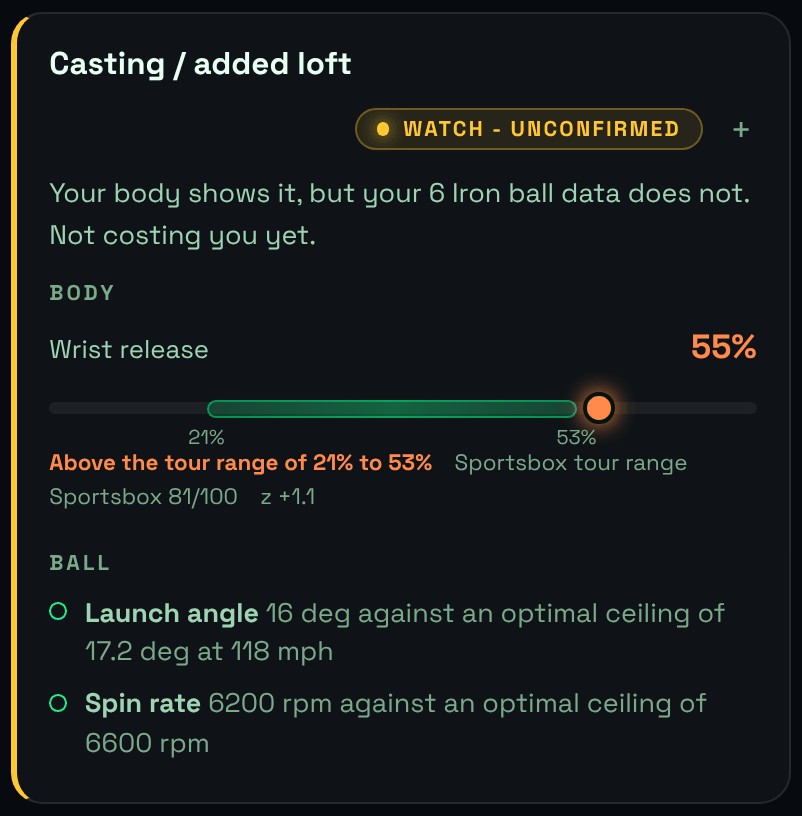
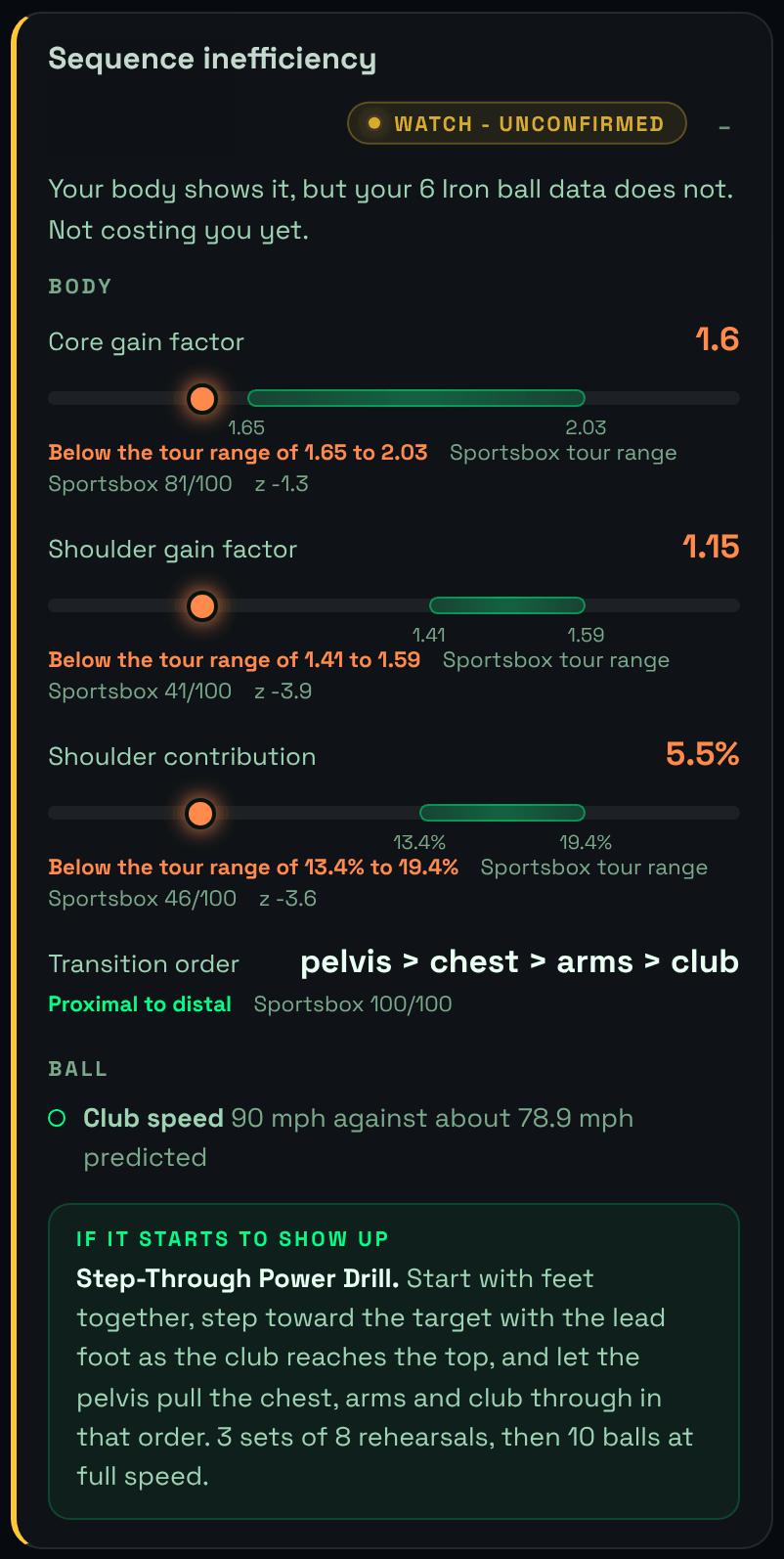
These are the cases that save golfers the most time. Without the ball side, a shoulder gain factor 3.9 standard deviations below tour looks like the first thing to fix. With it, you can see it is not costing this golfer any speed today.
4. What is working
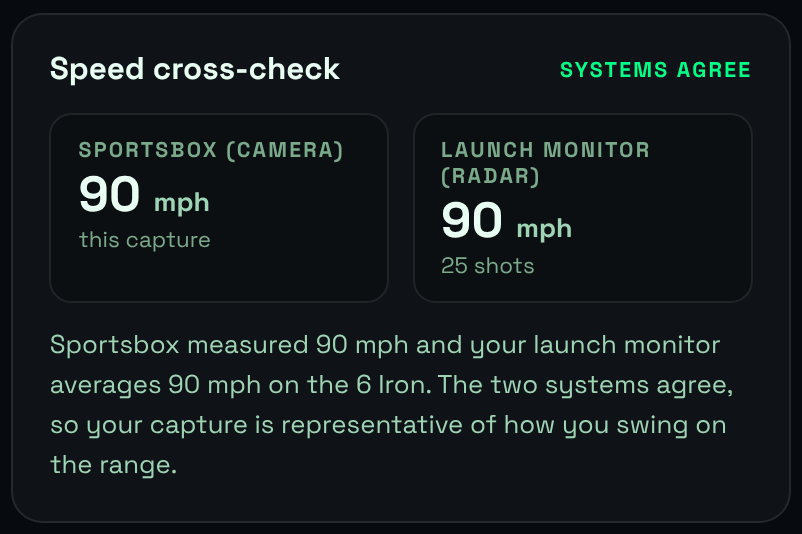
5. A cross-check between the two systems
How to add a report
- Go to Add a session and choose Swing biomechanics.
- Upload the Sportsbox PDF (or a PNG or JPG screenshot of the metrics).
- Check what was read. Values are grouped like the report, with tour ranges beside them; anything hard to read is marked "check", and anything not printed is left empty, never guessed. Confirm the club and date, then save.
- Open Swing Analyzer, Body and Ball.
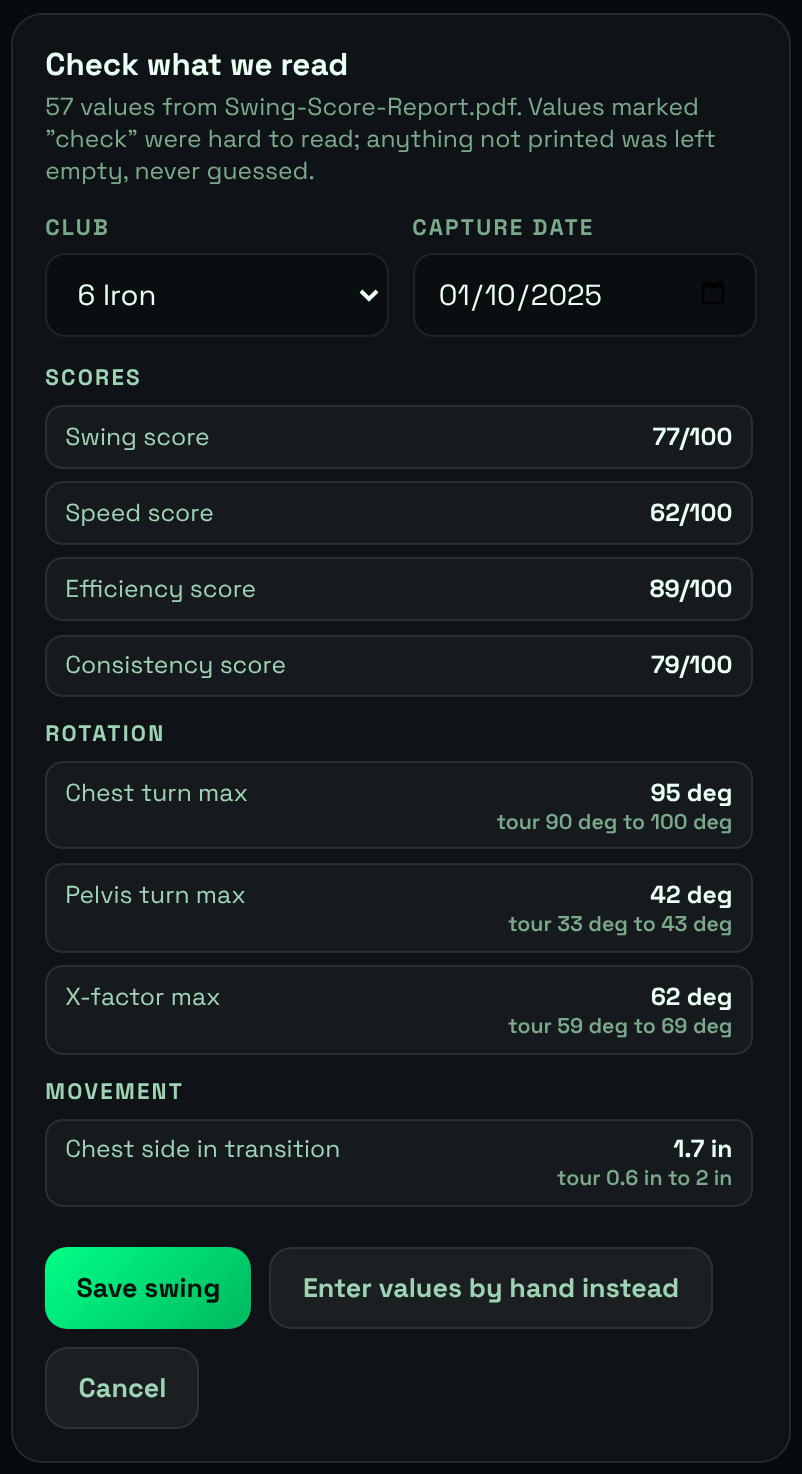
If a report cannot be read, you can type the six values the links use most, all printed on a Swing Score Report: pelvis lift into impact, sway gap spread at impact, wrist release percent, shoulder gain factor, x-factor max and transition order.
Choosing the ball data
By default ShotIQ compares against sessions with the same club hit within 21 days of the capture. If there are none, it uses your latest sessions with that club and lowers the confidence of any finding one step, because the body and the ball were measured at different times. You can also pick a date range or specific sessions, for example the session you hit the day of the capture.
Over time
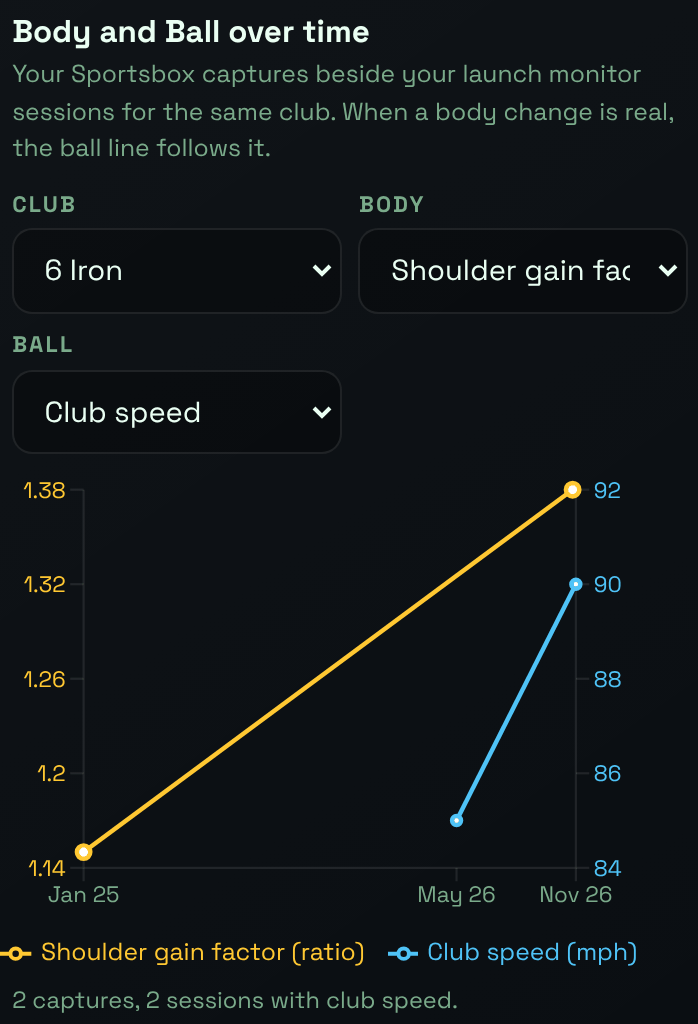
Each capture also feeds a rolling baseline of your own body numbers, so later captures are compared with your norm and not only the tour's. On Progress, the Body and Ball card plots any body metric beside any ball metric for the same club, so you can watch a body change and a ball change converge.
Honest by design
- The diagnosis is made by fixed, published rules, never by an AI. The same report and the same sessions always give the same answer. The optional "Coach's read" only rewords findings that are already made.
- Consistency numbers (standard deviations across your swings) are kept apart from positions, so a spread is never mistaken for an angle.
- A link the report or your sessions cannot support is shown as "not in report" or "can't check yet", never filled in.