Connect All Your Golf Data
Most golfers who care about improving already own more data than they can use. A launch monitor app full of range sessions. A simulator with a season of rounds. A camera roll of swing videos. A Sportsbox report from a lesson. A GPS app or a scorecard from Saturday.
On this page
Each one answers its own small question. None of them talks to the others. So the questions that actually matter never get answered:
- Is the move my coach is working on showing up in my ball flight?
- Is what I fixed on the range reaching the course?
- Of everything that is "wrong", which one is costing me strokes?
ShotIQ exists to answer those. It takes every kind of golf data you have, connects it, and turns it into one clear answer: the thing to work on, why, the drill that fixes it, and proof when it reaches your score.
Every source ShotIQ connects
| Your data | What ShotIQ does with it | Where it shows up |
|---|---|---|
| Launch monitor and sim range sessions | Reads exports from 13+ devices (CSV, TSV, Excel, PDF or a screenshot), validates the physics, and files every shot to the right club. | My Bag, gapping, dispersion, Progress, the AI Coach |
| Sim rounds | Scores simulator rounds from their exports, shot by shot, with strokes gained and a sim handicap beside your real one. | CourseIQ, Sim vs Course |
| Practice: targets, wedges, drills | Measures proximity, not just carry; builds a confidence-scored wedge matrix; tracks drills against the metric that proves the fix. | Target Lab, Wedge Matrix, Practice Lab |
| Swing videos | Finds your real address, top and impact frames on your phone and measures turn, posture and angles, fused with your launch data. | Swing Analyzer |
| Swing biomechanics reports | Reads a Sportsbox AI Swing Score Report and checks every body metric against what your ball actually did. | Body and Ball |
| On-course play | A live GPS caddie that picks clubs from your own carries, plus shot logging with ball flight, lie and putts, building strokes gained hole by hole. Scorecard photos and shot-log files import too. | On the course, Round Review, My Course Game |
| Putting | Your phone on a stand measures start line, speed and stroke, and replays each putt on a sloped green. | Putting Lab |
| Your bag and your coach | Real club specs, head-to-head gear tests, and lessons, plans and messages shared with your coach. | My Bag, Gear Lab, Coach Hub |
You do not need all of it. Every source works on its own, and each one you add makes the others smarter. Your Last 30 Days, at the top of the home screen, shows you exactly which of them you are using and what they have said together this month.
Where the value is: the connections
Any app can store a number. The value is in what happens when two sources meet.
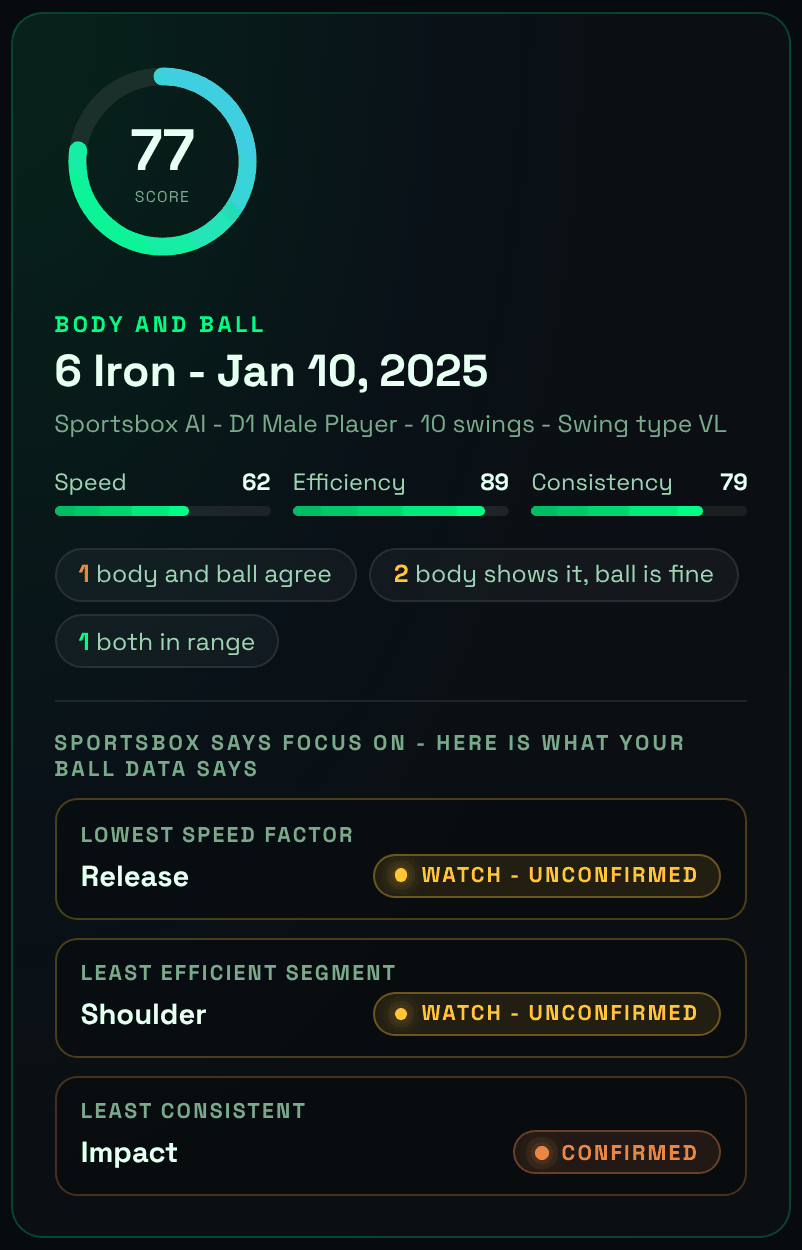
Body to ball. Sportsbox says your shoulder gain factor is below the tour range. Is it costing you anything? Body and Ball checks your launch monitor: if your club speed is where your body predicts, it is something to watch, not something to fix. If the ball shows the pattern too, it becomes a confirmed finding with a drill and a strokes figure. Body data alone is a hypothesis; body data the ball confirms is a finding.
Video to ball. The Swing Analyzer reads your swing positions with your launch numbers beside them, so a face or path number on the range has a picture of the swing that produced it.
Range to course. The carries you hit on the range become the clubs the caddie picks on the course, and the shots you log on the course come back to My Bag beside your range numbers. The Transfer Score and the range-to-course checks show whether what you fixed in practice survived contact with a real hole.
Sim to course. A sim handicap and a course handicap from the same maths tell you how far your simulator game is from your real one, and which part of the game the gap lives in.
Practice to score. Target Lab and Scoring Windows put a proximity, and a strokes value, on every yardage, so practice goes where the strokes are.
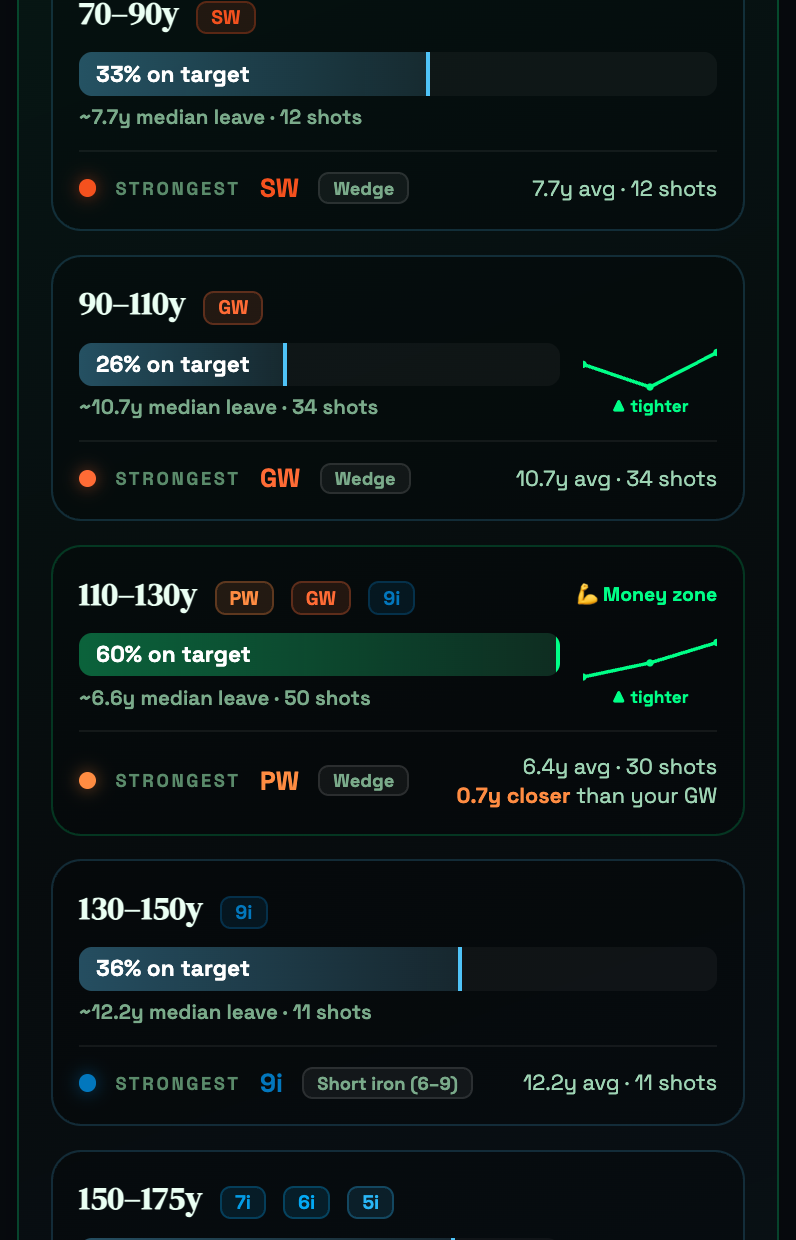
Course back to practice. Strokes gained from your rounds ranks what is costing you, and the AI Coach and Game Plan turn the top item into the next practice session, then check your next data to see if it worked.
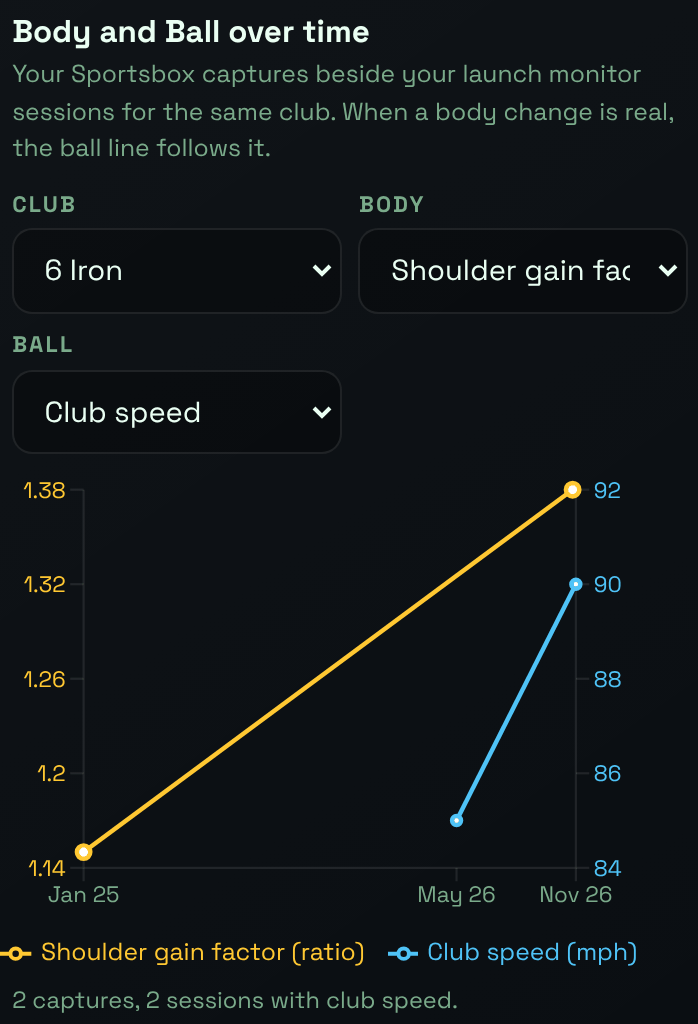
Over time, all of it together. Every connection is tracked. On Progress, a body metric from your Sportsbox reports sits beside a ball metric from your launch monitor, so you can see a swing change reach the ball.
Your Last 30 Days: every connection on one screen
Connected data is easy to claim and hard to show. So ShotIQ shows it. The first thing on the home screen is a ring of the nine sources above, with a lit thread drawn between any two of them that produced a finding in the last thirty days.
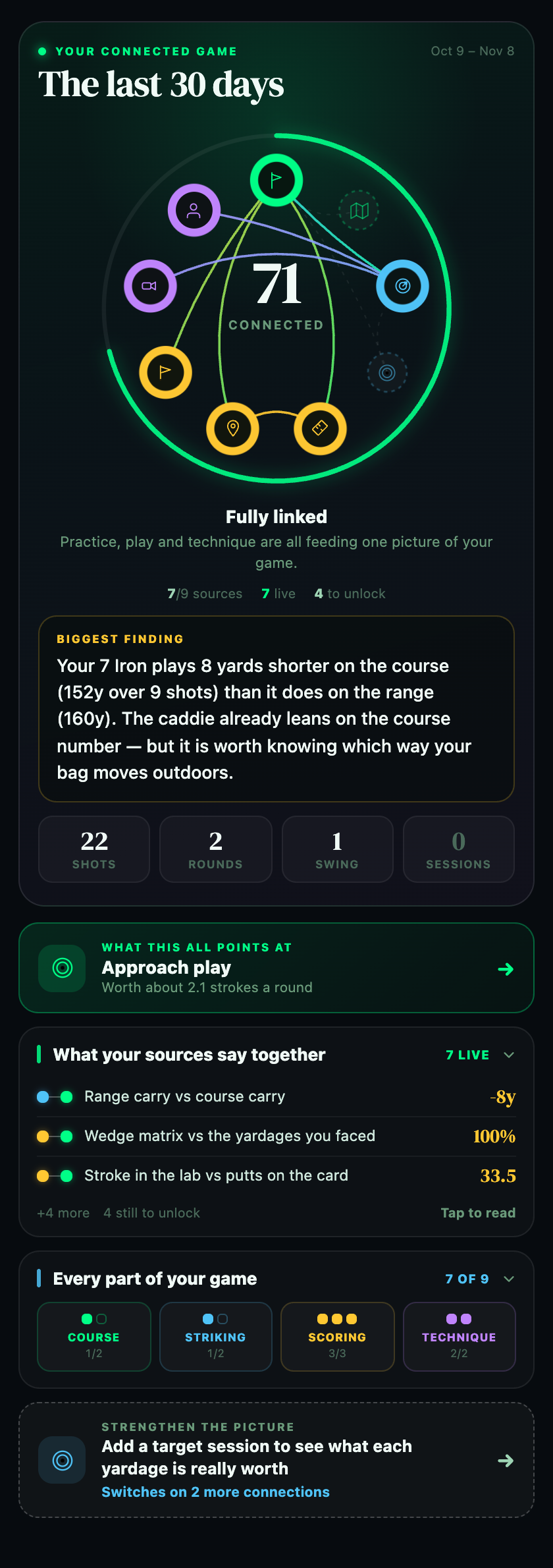
One source is nine dots and no threads. Six sources is a web. That picture is the whole argument, and it is drawn from your own data rather than a marketing diagram.
Eleven joins run every time. Range carry against course carry. Where your practice goes against what your rounds actually demand. Your wedge matrix against the yardages the course gave you. Your lab putting stroke against the putts on your card. Your short-game reps against what you gained around the green. Indoor scoring against outdoor. Each one is a question that needs two sources, and none of them can be answered by a single app.
Every join is honest about what it knows. A finding is live when both sources are there and the numbers support it, almost when both are connected but one does not have enough behind it yet, and locked when a source is missing. A locked finding still tells you what it will say — so you always know what the next upload buys you, before you make it.
The sources you are not using stay on the screen. The instinct is to hide what is empty. The opposite is right: an unlit node is a hole in the picture of your own game, and each one names the insight that would switch it on. Alongside it sits a connection score — half of it is how many sources you use, half is how many findings actually fired — and the one source that would unlock the most.
That is the practical version of everything above. Not "we connect your data", but: here are your connections, here is what they found, here is the one that is missing.
No data yet? Start on the course
You do not need a launch monitor to start. Play a round with the GPS caddie and log each shot as you go: the club, where it finished, the ball flight. One round gives you strokes gained by part of the game and the start of your real carries. Every round after that sharpens both, and if you add a launch monitor, a sim or a Sportsbox report later, it connects to everything you have already built.
The rule behind every connection
ShotIQ only says what the data supports. A finding needs evidence from both sides; a number your device did not record is shown as missing, never guessed; and when the data is too thin to judge, ShotIQ says so instead of filling the gap. How that works is laid out in How ShotIQ Works and Where ShotIQ Says "I Don't Know".